A two-bar drum loop at 152 BPM, laid end to end four times and rendered twice through Compressor 1.0.0 at 44.1 kHz: untouched, and through Glue. Judge how the body sits under the hit.
StudioZIO software
StudioZIO Compressor
Pick the behaviour. Move one slider.
Two compression modes behind one control: Adaptive for fast transparent work, Glue for slower cohesion, with the reduction on its own meter.
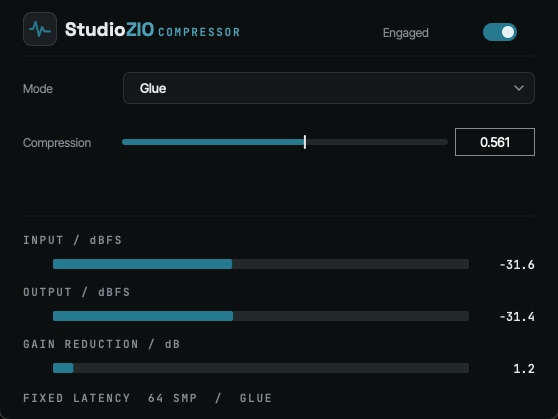
The Compressor window
Hear it
The same loop, twice
One loop rendered twice and switched instantly, so the playhead never moves. Both takes are matched to −20.0 LUFS integrated with peaks at or below −1 dBTP: at different levels the louder one always wins and the comparison tells you nothing.
Modes
Two behaviours
The mode decides how the stage moves. The Compression control decides how much of that movement you get. Nothing else changes between them.
- Adaptive
- Fast and transparent, for general-purpose work: it follows the material and stays out of the way.
- Glue
- Slower, with a natural release, for drums, buses and mixes, where cohesion matters more than speed.
Surface
Three controls
There is no threshold, no ratio, no attack or release to set, and no output trim to put back what the stage took. The mode carries those decisions.
- Mode
- Adaptive or Glue.
- Compression
- How much of that mode's behaviour is applied.
- Engaged
- Takes the stage out of circuit for comparison.
Metering
Three readings
The level going in, the level coming out, and the reduction between them, readable while the material plays.
- Input
- dBFS.
- Output
- dBFS.
- Gain reduction
- dB.
Official macOS installer
Compressor 1.0.0
Version 1.0.0 · Audio Unit (AU) · VST3 · AAX · Standalone
- Installer
StudioZIO-Compressor-1.0.0.pkg- Platform
- macOS
- Latency
- 64 samples, in either mode.
- SHA-256
- 49db1dddf2a86f115bfe35d76e3a49435a8a31c607c93f536e8b10838dea7ab5
Help
Support
Bug reports and technical questions reach the person who writes the code, through the contact form.