StudioZIO software

StudioZIO Maximizer

Drive it. The ceiling does the rest.

Adaptive limiting held to a strict final true-peak ceiling: set Input Gain and Ceiling, and read the cost on the meters.

Download for macOS Free Notarized build

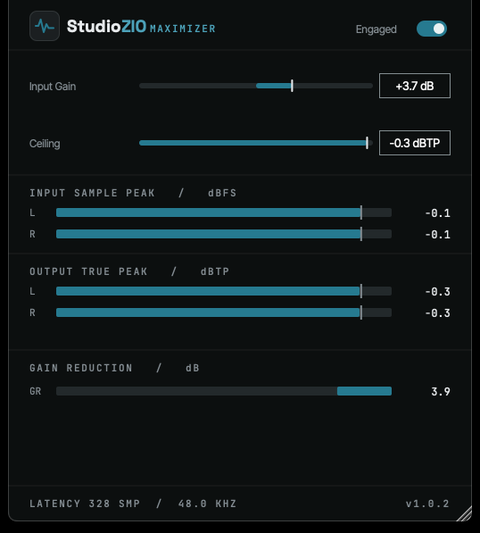
The Maximizer window

The StudioZIO Maximizer window: Input Gain and Ceiling controls, the Engaged switch, and input sample peak, output true peak and gain-reduction meters.

Hear it

The same drums, twice

One passage rendered twice and switched instantly, so the playhead never moves. Both takes are matched to −16.0 LUFS integrated with peaks at or below −1 dBTP: at different levels the louder one always wins and the comparison tells you nothing.

Maximizer · raw vs limited Real render · matched −16 LUFS
Output

One drum passage, rendered twice through Maximizer 1.0.2 at 44.1 kHz: untouched, and at 6.1 dB of gain reduction. Judge weight, transient and what the ceiling costs.

Surface

Three controls

Loudness is set by how hard you drive it and where you put the ceiling. There is no threshold, no release-mode list and no output trim to reconcile with either of them.

Input Gain
How hard the limiter is driven.
Ceiling
The true-peak level the output is held to. Default −0.3 dBTP.
Engaged
Takes the stage out of circuit for comparison.

Metering

Three readings

The level going in, the true peak coming out, and the reduction between them. The ceiling is the setting; the output meter is what actually left.

Input
Sample peak, dBFS.
Output
True peak, dBTP.
Gain reduction
dB.

Official macOS installer

Maximizer 1.0.2

Version 1.0.2 · Audio Unit (AU) · VST3 · AAX · Standalone

Developer ID signedApple notarizedUniversal
Installer
StudioZIO-Maximizer-1.0.2.pkg
Platform
macOS 11.0 (Big Sur) or newer
Latency
323 samples at 44.1 kHz, 328 at 48 kHz.
SHA-256
673da7c759b0cac3741ee816920a5ff2c199d01b975a1c6ffe7a48f65bcb3db6

Help

Support

Bug reports and technical questions reach the person who writes the code, through the contact form.